How to Improve Typing Speed from 20 WPM to 40 WPM in 30 Days - Proven Strategies
Learn proven techniques to double your typing speed in just 30 days. Follow our day-by-day plan with exercises, tips, and progress milestones for both English and Hindi typing.
Gurukul Team
Typing Education Experts
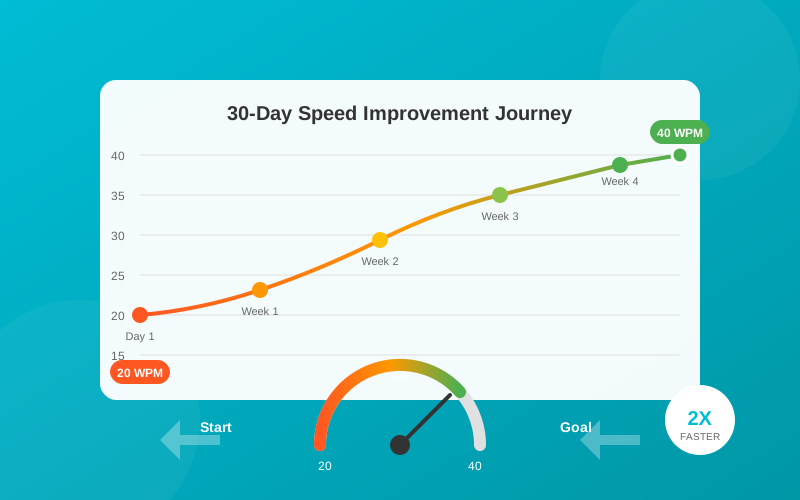
The 30-Day Typing Speed Transformation
Doubling your typing speed from 20 WPM to 40 WPM might seem like a daunting challenge, but with the right approach and consistent practice, it's absolutely achievable. This comprehensive guide will take you through a proven 30-day program that has helped thousands of students prepare for government typing exams.
Understanding Your Starting Point
Before we dive into the training program, let's understand what 20 WPM means:
- 20 WPM = Approximately 100 characters per minute
- Hunt and Peck Style: Looking at keyboard while typing
- Average Untrained Speed: Most people start around this level
- Government Requirement: Most exams need 30-40 WPM
To reach 40 WPM, you need to:
- Type 200 characters per minute
- Master touch typing (no looking at keyboard)
- Develop muscle memory for key positions
- Maintain 95%+ accuracy
The Science Behind Typing Speed
Muscle Memory Development
Typing fast is about muscle memory, not thinking. Your fingers should automatically know where each key is located. This takes approximately:
- 2-3 weeks: Basic key memorization
- 4-6 weeks: Comfortable touch typing
- 8-12 weeks: Speed optimization
The Learning Curve
| Week | Expected WPM | Focus Area |
|---|---|---|
| Week 1 | 20-25 | Touch typing basics, accuracy |
| Week 2 | 25-30 | Speed building, reducing errors |
| Week 3 | 30-35 | Complex words, punctuation |
| Week 4 | 35-40+ | Exam simulation, consistency |
Pre-Training Setup
1. Ergonomic Setup
Proper posture prevents fatigue and enables faster typing:
- Chair Height: Feet flat on floor, thighs parallel to ground
- Keyboard Position: Elbows at 90-degree angle
- Monitor Distance: Arm's length away
- Wrist Position: Neutral, not resting on desk
2. Equipment Check
- Keyboard: Use a comfortable keyboard (mechanical preferred)
- Lighting: Adequate lighting to reduce eye strain
- Environment: Quiet space for focused practice
3. Install Proper Software
Generic typing tutors don't cut it for exam preparation. Gurukul Typing Skill provides:
- Structured lessons for beginners
- Progress tracking and analytics
- Hindi typing support (Krutidev/DevLys)
- Exam-specific practice content
The 30-Day Program
Week 1: Foundation (Days 1-7)
Goal: Master home row and basic touch typing
Day 1-2: Home Row Only
Focus exclusively on home row keys:
- Left Hand: A S D F
- Right Hand: J K L ;
Exercise: Type these combinations for 30 minutes:
asdf jkl; asdf jkl;
ff jj dd kk ss ll aa ;;
fjfj dkdk slsl a;a;Target: 15 WPM with 95% accuracy on home row
Day 3-4: Add E and I
Introduce the most common vowels:
- E (middle finger up)
- I (middle finger up)
Exercise: Home row + E, I combinations
die lid side said
deaf seal deal leafTarget: Maintain accuracy while adding new keys
Day 5-6: Add G and H
These are the center keys:
- G (left index finger stretch)
- H (right index finger stretch)
Exercise: Practice reaching for G and H while maintaining home position
had has high his she
glad glass flag shelf
Day 7: Review and Test
- Take a 5-minute typing test
- Record your baseline WPM
- Identify problematic keys
- Note accuracy percentage
Week 1 Target: 22-25 WPM with 90%+ accuracy
Week 2: Expansion (Days 8-14)
Goal: Complete keyboard coverage
Day 8-9: Upper Row (Q W E R T Y U I O P)
Learn keys above home row:
we were power quote quite
the their theory thoughtTip: Keep fingers anchored on home row, reach up without moving entire hand
Day 10-11: Lower Row (Z X C V B N M)
Learn keys below home row:
can come become making
zebra exam box nextFocus: Lower row is harder - spend extra time here
Day 12-13: Numbers and Symbols
Introduce number row:
1 2 3 4 5 6 7 8 9 0
file2024 user123 code456
Day 14: Full Keyboard Review
Practice sentences using all keys:
The quick brown fox jumps over the lazy dog.
Pack my box with five dozen liquor jugs.
Week 2 Target: 28-32 WPM with 90%+ accuracy
Week 3: Speed Building (Days 15-21)
Goal: Push speed while maintaining accuracy
Day 15-16: Common Word Drills
Focus on high-frequency words:
the and that have with this from
government examination applicationExercise: Type each word 20 times, focusing on smooth keystrokes
Day 17-18: Phrase Practice
Type complete phrases:
Dear Sir/Madam,
With reference to your letter dated...
Kindly find enclosed herewith...Focus: Government document vocabulary
Day 19-20: Paragraph Practice
Type full paragraphs from:
- Newspaper articles
- Government notifications
- Official letters
Target: 500 words per session
Day 21: Speed Push Day
- Take multiple 5-minute tests
- Push for maximum speed
- Note your personal best
Week 3 Target: 33-37 WPM with 92%+ accuracy
Week 4: Mastery (Days 22-30)
Goal: Achieve and stabilize 40 WPM
Day 22-24: Exam Simulation
Practice with actual exam conditions:
- 15-minute typing sessions
- No backspace for errors
- Calculate net speed
Use Gurukul Typing Skill's exam mode for authentic practice.
Day 25-27: Weak Key Focus
Analyze your typing data:
- Which keys cause most errors?
- Which combinations slow you down?
- Create custom drills for weak areas
Day 28-29: Endurance Training
Build typing stamina:
- Type for 30 minutes continuously
- Maintain consistent speed
- Practice mental focus
Day 30: Final Assessment
- Take official typing test
- Record final WPM and accuracy
- Compare with Day 1 baseline
Week 4 Target: 38-42 WPM with 95%+ accuracy
Daily Practice Routine
Optimal Practice Schedule
Morning Session (20 minutes)
- 5 min: Warm-up drills
- 10 min: New lesson/technique
- 5 min: Speed test
Evening Session (20 minutes)
- 5 min: Review drills
- 10 min: Practice typing
- 5 min: Speed test
Warm-Up Exercises
Always start with warm-up:
asdf jkl; asdf jkl;
quick brown fox lazy dog
the government of india
Tips for Faster Progress
1. Never Look at the Keyboard
This is non-negotiable. Use:
- Keyboard covers
- Blank keycaps
- Pure willpower
Looking at keys breaks the muscle memory formation.
2. Focus on Problem Keys
Everyone has difficult keys. Common ones:
- B and N (far from home position)
- Numbers (long reach)
- Punctuation marks
3. Type Real Content
Don't just type random letters:
- News articles
- Book paragraphs
- Official documents
Real content helps develop rhythm.
4. Track Your Progress
Use Gurukul Typing Skill's analytics to:
- Monitor daily WPM trends
- Identify accuracy patterns
- See improvement over time
5. Take Breaks
Fatigue leads to errors:
- 5-minute break every 25 minutes
- Stretch fingers and wrists
- Look away from screen
Common Mistakes to Avoid
Mistake 1: Prioritizing Speed Over Accuracy
Wrong: Typing fast with many errors
Right: Typing accurately, then building speed
Errors in government exams reduce net speed significantly.
Mistake 2: Inconsistent Practice
Wrong: 3 hours once a week
Right: 30 minutes every day
Consistent practice builds muscle memory faster.
Mistake 3: Poor Posture
Wrong: Hunched over, wrists bent
Right: Ergonomic position maintained
Poor posture causes fatigue and slows you down.
Mistake 4: Using Wrong Fingers
Wrong: Using any finger for any key
Right: Designated fingers for each key
Proper technique is faster in the long run.
Hindi Typing Speed Improvement
For Hindi typing (Krutidev/DevLys), additional considerations:
Matra Practice
Hindi matras require extra practice:
का की कु कू के कै को कौ
राम राजा रात रुपया
Conjunct Letters
Half-letters and conjuncts:
क्या प्र स्त श्र त्र
प्रार्थना आवेदन पत्र
Speed Targets for Hindi
| Layout | Beginner | Intermediate | Exam Ready |
|---|---|---|---|
| Krutidev | 15 WPM | 25 WPM | 30+ WPM |
| DevLys | 15 WPM | 25 WPM | 30+ WPM |
How Gurukul Typing Skill Accelerates Your Progress
Our software is designed specifically for this 30-day transformation:
Structured Curriculum
- Day-by-day lesson plans
- Progressive difficulty
- Exam-focused content
Real-Time Feedback
- Instant WPM calculation
- Error highlighting
- Accuracy percentage
Hindi Support
- Krutidev keyboard layout
- DevLys keyboard layout
- Hindi lesson content
Progress Analytics
- Daily/weekly graphs
- Improvement trends
- Personal best tracking
Offline Practice
- No internet needed
- Practice anywhere
- Perfect for travel
Maintaining Your Speed
After reaching 40 WPM, maintain it with:
Daily Maintenance (10 minutes)
- Quick warm-up
- One speed test
- Address any regression
Weekly Practice (30 minutes)
- Full typing session
- Try new content
- Push for higher speeds
Before Exams
- Intensive practice
- Exam simulation
- Build confidence
Conclusion
Improving from 20 WPM to 40 WPM in 30 days is achievable with:
- Commitment: 40 minutes daily practice
- Proper Technique: Touch typing, correct posture
- Right Tools: Gurukul Typing Skill
- Consistency: No skipping days
Start your transformation today. Download Gurukul Typing Skill and follow this 30-day program to achieve your government exam typing requirements.
Download Gurukul Typing Skill - Your typing success partner!
Keywords: improve typing speed, 40 WPM, typing practice, touch typing, WPM increase, typing test preparation, keyboard speed, typing exercises, government exam typing
Tags
This guide is helpful for students in
Relevant for these exams
Start Practicing with Gurukul Typing Skill
Download our free trial and experience structured typing lessons designed for government exam preparation.
Ready to Start Your Typing Journey?
Join thousands of students across Rajasthan, Madhya Pradesh, and other states who are preparing for government typing tests with Gurukul.