CPCT Exam Preparation 2026: Complete Typing Test Guide for Madhya Pradesh Students
Master CPCT exam with our comprehensive guide. Learn about exam pattern, typing requirements, English and Hindi speed standards, and effective preparation strategies for MP students.
Gurukul Team
Typing Education Experts
Introduction to CPCT Exam
The Computer Proficiency Certification Test (CPCT) is a mandatory examination for candidates seeking government jobs in Madhya Pradesh that require computer and typing proficiency. Conducted by the Madhya Pradesh Agency for Promotion of Information Technology (MAP_IT), CPCT has become a crucial credential for lakhs of job aspirants in MP.
This comprehensive guide covers everything you need to know about CPCT - from exam pattern to preparation strategies.
What is CPCT?
Official Definition
CPCT stands for Computer Proficiency Certification Test. It is:
- A standardized computer proficiency test
- Mandatory for most MP government jobs requiring computer skills
- Conducted online at designated centers across MP
- Valid for lifetime (once passed)
Conducting Body
- Full Form: Madhya Pradesh Agency for Promotion of Information Technology
- Hindi: मध्य प्रदेश एजेंसी फॉर प्रमोशन ऑफ इन्फॉर्मेशन टेक्नोलॉजी
- Website: cpct.mp.gov.in
Why CPCT Matters
- Mandatory Requirement: Most MP government jobs require CPCT
- Universal Acceptance: One certificate for multiple applications
- Lifetime Validity: No need to renew
- Standardized Assessment: Fair evaluation for all
CPCT Exam Pattern 2026
Exam Structure
The CPCT exam consists of two parts:
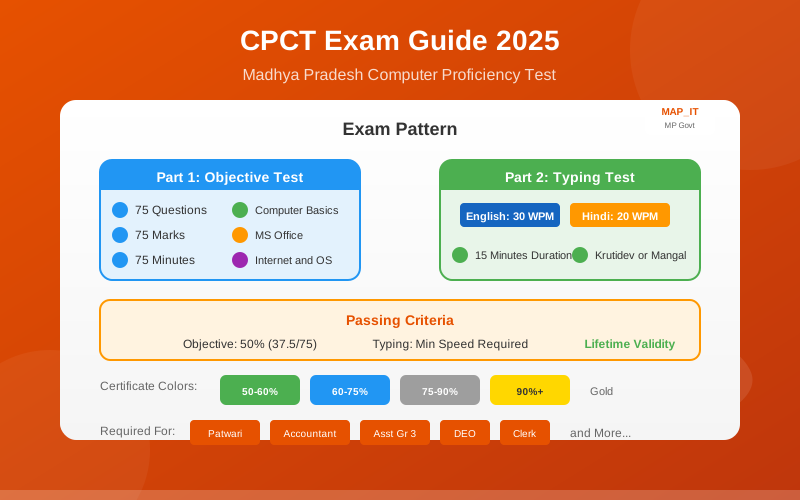
Part 1: Objective Test (75 Questions - 75 Marks)
| Section | Questions | Marks |
|---|---|---|
| General Computer Knowledge | 25 | 25 |
| MS Office (Word, Excel, PowerPoint) | 25 | 25 |
| Internet & Networking | 15 | 15 |
| Operating System | 10 | 10 |
| Total | 75 | 75 |
Duration: 75 minutes
Part 2: Typing Test (25 Marks)
| Language | Minimum Speed | Duration |
|---|---|---|
| English | 30 WPM (Net) | 15 minutes |
| Hindi | 20 WPM (Net) | 15 minutes |
Total Duration: 90 minutes (75 + 15 for typing)
Passing Criteria
To pass CPCT, you must:
- Objective Section: Score minimum 50% (37.5 out of 75)
- Typing Section: Achieve minimum speed requirement
- Combined: Both sections must be cleared
Scoring System
Objective Section:
- Correct Answer: +1 mark
- Wrong Answer: No negative marking
- Unattempted: 0 marks
Typing Section:
- Speed calculated as Net WPM
- Errors deducted from gross speed
- Minimum accuracy required
Typing Test in Detail
English Typing Requirements
Minimum Speed: 30 WPM (Net)
Duration: 15 minutes
Keyboard: Standard QWERTY
How Speed is Calculated:
Gross WPM = (Total Characters / 5) / 15
Net WPM = Gross WPM - (Errors)
What to Expect:
- Passage of approximately 450-500 words
- Mix of common and official vocabulary
- Punctuation and numbers included
Hindi Typing Requirements
Minimum Speed: 20 WPM (Net)
Duration: 15 minutes
Keyboard Options: Krutidev OR Mangal (Unicode)
Krutidev Layout:
- Most popular choice among candidates
- Phonetic layout
- Easier to learn for beginners
Mangal (Inscript) Layout:
- Unicode-based
- Government recommended
- Steeper learning curve
Tip: Choose one layout and master it. Most coaching centers and Gurukul Typing Skill teach Krutidev.
Detailed Syllabus
Computer Fundamentals (25 Questions)
- Computer Basics
- Definition and types of computers
- Generations of computers
- Computer components (CPU, RAM, ROM, etc.)
- Input/Output devices
- Number Systems
- Binary, Octal, Hexadecimal
- Conversions between systems
- Computer Memory
- Primary vs Secondary memory
- RAM types (SRAM, DRAM)
- Storage devices
- Software Concepts
- System software vs Application software
- Programming languages
- Compiler, Interpreter, Assembler
MS Office (25 Questions)
- MS Word
- Document creation and formatting
- Tables, headers, footers
- Mail merge
- Shortcuts and tools
- MS Excel
- Spreadsheet basics
- Formulas and functions (SUM, AVERAGE, IF, VLOOKUP)
- Charts and graphs
- Data sorting and filtering
- MS PowerPoint
- Presentation creation
- Slide layouts and transitions
- Animation effects
- Slide show options
Internet & Networking (15 Questions)
- Internet Basics
- History and evolution
- ISPs and connections
- Web browsers
- Email concepts
- CC, BCC, attachments
- Email etiquette
- Networking
- LAN, WAN, MAN
- Network topologies
- Protocols (TCP/IP, HTTP, FTP)
- Cyber Security
- Viruses and malware
- Firewall and antivirus
- Safe browsing practices
Operating System (10 Questions)
- Windows OS
- Desktop and taskbar
- File management
- Control Panel
- System settings
- OS Concepts
- Functions of OS
- Types of OS
- Process management
CPCT Preparation Strategy
Phase 1: Assessment (Week 1)
Day 1-2: Evaluate Current Level
- Take a mock CPCT test
- Check your typing speed (English & Hindi)
- Identify weak areas
Day 3-7: Create Study Plan
- Set realistic targets
- Allocate time for each section
- Plan typing practice schedule
Phase 2: Foundation (Weeks 2-4)
Computer Knowledge
- Study fundamentals thoroughly
- Make notes for quick revision
- Practice MCQs daily
MS Office
- Hands-on practice essential
- Learn shortcuts
- Focus on frequently asked topics
Typing Development
- Daily 1-hour practice minimum
- Use Gurukul Typing Skill for structured learning
- Focus on accuracy before speed
Phase 3: Speed Building (Weeks 5-6)
Objective Section
- Solve previous year papers
- Take timed mock tests
- Identify and revise weak topics
Typing
- Push for target speed
- Practice with exam-like content
- Build stamina for 15-minute tests
Phase 4: Exam Simulation (Week 7-8)
Full Mock Tests
- Simulate exact exam conditions
- Time yourself strictly
- Review and analyze errors
Final Revision
- Quick revision of notes
- Focus on high-yield topics
- Light practice, avoid burnout
Typing Preparation Tips
English Typing Strategy
Target: 35+ WPM (to have buffer over 30 WPM minimum)
Week-by-Week Plan:
| Week | Target WPM | Focus Area |
|---|---|---|
| 1 | 15-20 | Touch typing basics |
| 2 | 20-25 | Speed building |
| 3 | 25-30 | Accuracy improvement |
| 4 | 30-35 | Exam simulation |
| 5-6 | 35+ | Consistency |
Daily Routine:
- Morning: 30 min focused practice
- Evening: 15 min speed test
- Track progress daily
Hindi Typing Strategy
Target: 25+ WPM (to have buffer over 20 WPM minimum)
Krutidev Learning Path:
- Learn keyboard layout
- Master vowels (स्वर)
- Master consonants (व्यंजन)
- Practice matras (मात्राएं)
- Learn conjuncts (संयुक्त अक्षर)
- Speed building
Common Challenges:
- Half-letters (आधे अक्षर)
- Matra placement
- Special characters
Solution: Gurukul Typing Skill provides structured Hindi lessons covering all these aspects systematically.
Common CPCT Questions
Frequently Asked Topics
Computer Fundamentals:
- Full forms (RAM, ROM, CPU, etc.)
- Computer generations
- Input/Output devices classification
- Memory hierarchy
MS Word:
- Shortcut keys (Ctrl+S, Ctrl+C, Ctrl+V, etc.)
- Mail merge steps
- Header/Footer options
- Page setup
MS Excel:
- Basic formulas (SUM, AVERAGE, COUNT)
- Cell references (Absolute vs Relative)
- Chart types
- Sorting and filtering
MS PowerPoint:
- Slide layouts
- Animation types
- Slide show shortcuts
- Presentation views
Internet:
- Full forms (URL, HTTP, ISP, etc.)
- Email components
- Browser functions
- Basic HTML tags
Resources for CPCT Preparation
Official Resources
- CPCT Official Website: cpct.mp.gov.in
- Sample Papers: Available on official site
- Syllabus PDF: Download from MAP_IT
Study Materials
For Objective Section:
- Arihant CPCT Book
- Kiran CPCT Guide
- Previous year papers
For Typing:
- Gurukul Typing Skill (Recommended)
- Daily newspaper typing
- Government document practice
Online Mock Tests
Take regular mock tests to:
- Assess preparation level
- Get familiar with interface
- Build time management skills
Exam Day Tips
Before the Exam
- Verify Admit Card: Check date, time, center
- Visit Center: Know the location beforehand
- Documents Ready: Admit card, ID proof
- Rest Well: Sleep early the night before
- Light Revision: Don't cram new topics
At the Exam Center
- Arrive Early: At least 1 hour before
- Verify Details: Check your assigned computer
- Read Instructions: Carefully follow all guidelines
- Check Keyboard: Familiarize with the keyboard before starting typing test
During the Exam
Objective Section:
- Don't spend too much time on one question
- Attempt all questions (no negative marking)
- Mark uncertain questions for review
- Use remaining time to review
Typing Test:
- Stay calm and focused
- Maintain steady rhythm
- Don't panic over errors
- Keep eyes on screen, not keyboard
After the Exam
- Don't discuss answers immediately
- Wait for official results
- Keep admit card safe
CPCT Certificate and Validity
Certificate Details
Once you pass CPCT:
- Certificate generated digitally
- Download from official portal
- Valid for lifetime
- Acceptable across all MP government departments
Score Categories
| Score Range | Certificate Color | Significance |
|---|---|---|
| 50-60% | Green | Passed |
| 60-75% | Blue | Good |
| 75-90% | Silver | Very Good |
| 90%+ | Gold | Excellent |
Using CPCT Certificate
- Required during document verification
- Mention score in applications
- Higher scores may give preference
Government Jobs Requiring CPCT
Positions Requiring CPCT in MP
- Patwari (पटवारी)
- Accountant (लेखापाल)
- Assistant Grade 3 (सहायक श्रेणी 3)
- Data Entry Operator
- Junior Clerk
- Computer Operator
- Various technical posts
Departments Accepting CPCT
- Revenue Department
- Education Department
- Health Department
- Panchayat and Rural Development
- Urban Development
- All state government departments
How Gurukul Typing Skill Helps CPCT Aspirants
CPCT-Specific Features
- Krutidev Keyboard Support
- Complete Hindi typing course
- All characters and matras covered
- Exam-specific content
- English Typing Course
- Structured lessons
- Government vocabulary
- Speed building exercises
- Progress Tracking
- Daily WPM monitoring
- Accuracy tracking
- Improvement graphs
- Exam Simulation
- 15-minute timed tests
- CPCT-like interface
- Realistic practice
- Offline Capability
- Practice without internet
- Perfect for rural MP areas
- No data charges
Success Stories from MP
Thousands of students from Bhopal, Indore, Jabalpur, Gwalior, and other MP cities have cleared CPCT using Gurukul Typing Skill.
Conclusion
CPCT is your gateway to government jobs in Madhya Pradesh. With proper preparation focusing on both the objective section and typing test, clearing CPCT is definitely achievable.
Key Takeaways:
- Understand the exam pattern thoroughly
- Practice typing daily (both English and Hindi)
- Study computer fundamentals systematically
- Take regular mock tests
- Stay calm on exam day
Start your CPCT preparation today with Gurukul Typing Skill - the trusted partner for MP government exam aspirants.
Download Gurukul Typing Skill and begin your journey to a government career!
Keywords: CPCT exam, CPCT preparation, Madhya Pradesh CPCT, CPCT typing test, CPCT syllabus 2026, CPCT Hindi typing, CPCT English typing, MP government jobs, computer proficiency test
Tags
This guide is helpful for students in
Relevant for these exams
Start Practicing with Gurukul Typing Skill
Download our free trial and experience structured typing lessons designed for government exam preparation.
Ready to Start Your Typing Journey?
Join thousands of students across Rajasthan, Madhya Pradesh, and other states who are preparing for government typing tests with Gurukul.